In 2025, I started building a content management system from scratch. Not in PHP, not in Node.js, not in Python — in Go. Five months later, oCMS powers this site and handles everything from content editing to AI chatbots to webhook delivery. This is the story of how it was built, why I made the choices I made, and what I learned along the way.
// Why Build a CMS at All?
The obvious question first. WordPress exists. Drupal exists. Ghost exists. Strapi, Directus, Hugo, dozens of others — they all work. So why spend years building another one?
Three reasons.
First, I wanted to own my stack end to end. After 30+ years of building on other people’s platforms, I wanted a CMS where I understood every line. Where I could fix a bug at 2 AM without waiting for an upstream release. Where the architecture reflected my opinions about how web software should be built, not someone else’s opinions from 2005.
Second, I wanted to prove that Go is a serious web application language. Go has a reputation as an infrastructure language — great for CLIs, APIs, and microservices, but somehow not for “real” web apps with admin panels, media libraries, and content editors. I wanted to challenge that assumption.
Third, and most honestly: building a CMS is the best way I know to deeply learn web architecture. A CMS touches everything — authentication, authorization, database design, file uploads, caching, search, templating, SEO, internationalization, security. If you can build a CMS that works in production, you understand web development at a level that no tutorial can teach.
// The Architecture at a Glance
Before I go deep on individual decisions, here’s the 30-second overview of what oCMS looks like today:
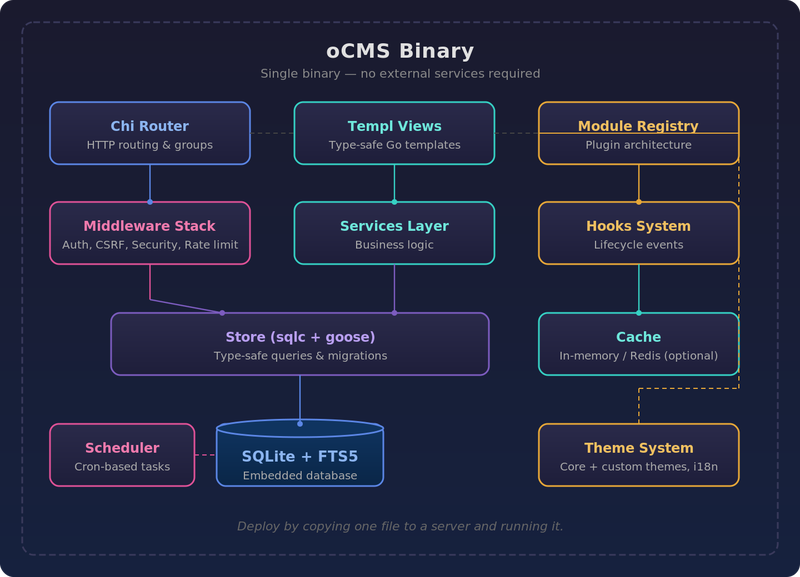
Single binary. No external services required (Redis is optional). Deploy by copying one file to a server and running it. That’s the philosophy in a nutshell.
// Decision 1: Why Go and Not
I’ve built web applications in PHP, Python, Node.js, Swift and Go. I’ve shipped production code in all of them. Here’s why Go won for this project:
Deployment simplicity. A Go binary is a single file. No runtime to install. No dependency hell. No node_modules black hole. No composer install praying that some package’s C extension compiles. You scp a binary to a server, run it, and it works. After years of debugging deployment issues caused by runtime mismatches, this alone was worth the switch.
Concurrency that makes sense. A CMS has to handle concurrent requests, background tasks (webhook delivery, image processing, scheduled publishing), and long-running connections (SSE, health checks) simultaneously. Go’s goroutines and channels make this natural. No callback spaghetti. No async/await coloring every function signature. Just go doThing() and it works.
Type safety without ceremony. Go catches entire classes of bugs at compile time that PHP and Python discover in production. But unlike Java or C#, Go doesn’t drown you in boilerplate, generics hierarchies, and framework abstractions. The code reads like what it does.
Performance for free. I don’t think about performance in oCMS. I don’t tune garbage collectors or add caching layers to compensate for a slow runtime. Go is fast enough that a SQLite-backed CMS on modest hardware serves pages in single-digit milliseconds. That headroom means I can focus on features instead of optimization.
The tradeoff? Go’s ecosystem for web applications is thinner than PHP’s or Node’s. There’s no Laravel, no Next.js, no “install this framework and get an admin panel for free.” Every feature in oCMS was built intentionally — which is both the cost and the point.
// Decision 2: SQLite as the Primary Database
This is the decision that raises the most eyebrows. A CMS backed by SQLite? Really?
Really. And I’d make the same choice again.
Zero configuration. There is no database server to install, configure, secure, back up separately, or monitor. The database is a single file. Backup is cp. Migration to a new server is scp. This isn’t a toy benefit — it eliminates an entire category of operational complexity.
SQLite is not slow. Modern SQLite with WAL mode handles thousands of concurrent reads without breaking a sweat. For a content-focused site like a blog or corporate website — which is read-heavy by nature — SQLite is more than enough. I’ve benchmarked oCMS under load and the bottleneck is never the database.
FTS5 is genuinely excellent. SQLite’s full-text search extension gives oCMS a real search engine without deploying Elasticsearch or Meilisearch. It supports ranked results, phrase queries, and prefix matching. For a CMS with a few thousand pages, it’s perfect.
The limitations are real, though. SQLite doesn’t love concurrent writes — there’s a single writer lock. For a CMS where writes are admin operations (creating/editing content) and reads are the dominant workload (visitors reading pages), this is fine. If oCMS ever needed to handle thousands of simultaneous form submissions per second, I’d add a write queue or switch to PostgreSQL. But that’s a scaling problem I’m happy to have when it arrives.
The tooling sealed the deal. I use sqlc for type-safe SQL code generation and goose for migrations. Together they give me a workflow where I write raw SQL (no ORM abstraction leaking), sqlc generates type-safe Go functions from my queries, and goose manages schema evolution with up/down migrations. The result is a data layer that’s fast, explicit, and impossible to misuse at compile time.
-- queries/pages.sql
-- name: GetPublishedPageBySlug :one
SELECT id, title, slug, content, meta_description,
       published_at, updated_at
FROM pages
WHERE slug = ? AND status = 'published'
  AND (published_at IS NULL OR published_at <= CURRENT_TIMESTAMP)
LIMIT 1;
sqlc turns this into a Go function with a typed return struct. No reflection. No runtime query building. No interface{} type assertions. Just functions and structs.
// Decision 3: templ Instead of html/template
Go’s standard html/template package is fine for simple pages. But for a CMS with dozens of admin views, reusable components, nested layouts, and conditional rendering, it becomes painful. No type checking on template variables. No IDE autocompletion. Errors at runtime, not compile time.
templ solves all of this. It’s a Go templating language that compiles to Go code. Your templates are type-checked at build time. Your IDE understands them. Refactoring a struct field name? The compiler tells you which templates break.
// views/article.templ
templ ArticlePage(page model.Page, tags []model.Tag) {
    <article>
        <h1>{ page.Title }</h1>
        <time datetime={ page.PublishedAt.Format(time.RFC3339) }>
            { page.PublishedAt.Format("Jan 2, 2006") }
        </time>
        @templ.Raw(page.Content)
        <div class="tags">
            for _, tag := range tags {
                <a href={ templ.SafeURL("/tag/" + tag.Slug) }>
                    #{ tag.Name }
                </a>
            }
        </div>
    </article>
}
This is compiled to Go code by the templ generate command. The resulting functions are called directly from handlers — no template parsing at runtime, no file loading, no template.Must() panics in production. It’s just Go functions that write HTML to an io.Writer.
The downside: templ adds a code generation step to the build. You run make templ before make build. It’s one extra command, and the Makefile handles it, but it’s a step that doesn’t exist with plain html/template. Worth it? Absolutely. Compile-time template safety has caught more bugs than I can count.
// Decision 4: HTMX + Alpine.js for the Admin Panel
This is the decision I’m most opinionated about.
The oCMS admin panel has a fully interactive UI: sortable lists with drag-and-drop, bulk operations, inline editing, modal dialogs, real-time search, toast notifications, pagination with per-page selectors. It’s a real application, not a static form.
And it’s built without React, Vue, Svelte, or any JavaScript framework that requires a build step, a bundler, a virtual DOM, or a state management library.
HTMX handles server-driven interactivity. Click a “delete” button? HTMX sends a DELETE request and swaps the response HTML into the page. Load more items? HTMX fetches the next page and appends it. No JSON serialization, no client-side rendering, no state synchronization. The server renders HTML — which it’s already good at — and HTMX puts it in the right place.
Alpine.js handles the small amount of client-side state that HTMX doesn’t cover: dropdown menus, toggle switches, tab panels, form validation feedback. It’s 15KB gzipped and feels like writing HTML attributes, not JavaScript.
The result? The entire admin panel’s JavaScript footprint is Alpine.js (15KB) + HTMX (14KB) + Klaro for cookie consent + TinyMCE for the rich text editor. That’s it. No webpack. No Vite. No npm run build that takes 30 seconds. No hydration. No client-side routing. No “loading skeleton while we fetch data from the API we could have just rendered server-side.”
I’m not anti-React. For a complex SPA — a design tool, a spreadsheet, a real-time dashboard — a frontend framework earns its weight. But for a CMS admin panel? Server-rendered HTML with progressive enhancement is simpler, faster to develop, faster to load, and easier to maintain. Fight me.
// Decision 5: The Module System
Early in development, I realized that a CMS needs extensibility without chaos. You want to add hCaptcha support, or analytics, or a database management tool — but you don’t want these concerns polluting the core codebase.
oCMS solves this with a module system inspired by Go’s own init() pattern:
// modules/hcaptcha/module.go
func init() {
    registry.Register(&HCaptchaModule{})
}
type HCaptchaModule struct {
    module.BaseModule
}
func (m *HCaptchaModule) Name() string { return "hcaptcha" }
func (m *HCaptchaModule) Init(app module.AppContext) error {
    // Initialize hCaptcha verification
    return nil
}
func (m *HCaptchaModule) RegisterRoutes(r chi.Router) {
    // Add verification endpoints
}
func (m *HCaptchaModule) Shutdown() error {
    return nil
}
Modules self-register using Go’s init() function. The registry loads them in dependency order. Each module can define its own routes, database migrations, template functions, and i18n locale files. You can enable or disable modules at runtime without restarting the application.
oCMS ships with 11 built-in modules: analytics (internal and external), database manager, developer tools, embed support, hCaptcha, email notifications, data migration, privacy tools, and Sentinel (a security monitoring module that’s always loaded first). Custom modules go in custom/modules/ and follow the same interface.
The hook system ties it together. Modules can listen for lifecycle events — page created, page published, form submitted, user logged in — and react to them. The webhook delivery system, for instance, is triggered by hooks. When a page is published, the hook fires, the webhook module picks it up, signs the payload with HMAC-SHA256, and delivers it with exponential backoff retries and a dead letter queue for failures.
// Decision 6: Security First, Not Security Later
Security in a CMS isn’t a feature — it’s a property of every feature. Here’s what oCMS does by default, not as an option:
- Argon2id password hashing — the current best practice, not bcrypt, not MD5-with-salt
- Content Security Policy with nonces — every response includes a CSP header with a unique nonce for inline scripts, blocking XSS attacks
- CSRF protection on every state-changing request
- Rate limiting — 10 req/s for public endpoints, 1 req/s for form submissions, configurable per-key limits for API access
- HTML sanitization — page content is sanitized in production mode to prevent stored XSS
- Secure cookies — HttpOnly, Secure, SameSite=Lax on every cookie
- API key CIDR restrictions — you can lock an API key to specific IP ranges
- Trusted proxy configuration — prevents IP spoofing via X-Forwarded-For
- Suspicious HTML pattern detection — blocks common injection patterns before they reach the database
- Comprehensive audit logging — every admin action is recorded in an event log
Production mode (OCMS_ENV=production) enforces stricter defaults: HTTPS for outbound webhook URLs, mandatory CAPTCHA on public forms, API CIDR allowlists, and HTML sanitization. You have to explicitly opt out of security, not opt in.
// What I’d Do Differently
Five monts in, with the benefit of hindsight:
I’d start with templ from day one. I initially used html/template and migrated to templ later. The migration was painful — hundreds of templates to rewrite. If I’d started with templ, I’d have saved weeks of work and had compile-time safety from the beginning.
I’d design the module hook system earlier. The hook system was added after several features were already built, which meant retrofitting existing code to emit events. If hooks had been the first architectural decision, the codebase would be cleaner.
I’d add an RSS feed on day one. It’s embarrassing that oCMS shipped without RSS. For a content platform, syndication is table stakes. It’s on the roadmap now, but it should have been in v1.
I’d invest more in JSON-LD structured data. Same story — SEO features like structured data schemas should be built into the theme layer from the start, not bolted on later. Lesson learned.
// The Numbers
Some concrete metrics for the curious:
- Binary size: ~50MB (production build with
-ldflags="-s -w") - Startup time: Under 1 second including migrations
- Memory usage: ~50-70MB idle with in-memory cache
- Dependencies: Moderate — Chi, sqlc-generated code, templ, goose, libvips for imaging, Alpine.js + HTMX on the frontend
- Internal packages: 27 packages in
internal/ - Handler categories: 24 (admin, auth, API, pages, media, forms, webhooks, etc.)
- Data models: 11 (Page, User, APIKey, Menu, Language, Translation, Form, Media, Event, Webhook, Config)
- Built-in modules: 11
- Middleware stack: 13 middleware components
- Makefile targets: 20+ (build, dev, migrate, assets, sqlc, templ, code-quality, security-audit, etc.)
- Linting: 11 active linters with strict enforcement — zero max issues per linter
// Who Is oCMS For?
oCMS isn’t trying to replace WordPress for everyone. It’s for developers who:
- Want a self-hosted CMS they can understand, modify, and extend
- Prefer Go’s deployment model (single binary) over PHP/Node runtime management
- Need a content platform with a real API, webhooks, and module extensibility
- Value type safety, compile-time checks, and explicit code over framework magic
- Want to run on modest hardware without a heavy stack (no PostgreSQL, no Redis, no Elasticsearch required)
If that sounds like you, the code is on GitHub. Star it, fork it, open an issue, or just read the source. I’ve learned more from reading other people’s Go code than from any book — maybe oCMS can return the favor.
// What’s Next for oCMS
The roadmap for 2026 is focused on three areas:
- Better AI integration — the Dify chatbot is just the start. I’m exploring MCP server integration, AI-assisted content editing, and automated SEO suggestions powered by local LLMs via Ollama.
- Content syndication — RSS/Atom feeds, automated social media cross-posting via webhooks, and newsletter integration.
- Developer experience — better documentation, a plugin marketplace, and a one-command demo deployment so people can try oCMS in 30 seconds.
Building a CMS in Go was the hardest and most rewarding project I’ve ever taken on. It forced me to make real architectural decisions — not follow a framework’s opinions, but form my own. Five months later, I’m running my own blog on my own CMS, and every page load is a reminder that the best way to understand software is to build it.
— Oleg Ivanchenko, Geneva, April 2026