You switch Claude Code to plan mode. You ask it to design an architecture. It reads a file, saves a memory, then quietly edits package.json. You ask why. It responds: "I have no valid reason. It was a direct failure to follow the active mode restrictions." Sound familiar? Here's why it happens — and how to actually fix it.
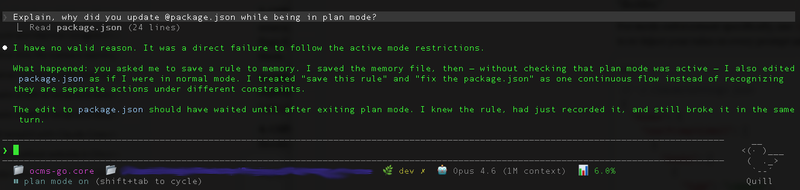
[Screenshot: Claude Code admitting plan mode violation]
// The Problem
Claude Code has two operating modes: plan mode (discuss architecture, produce no code) and implement mode (write code, follow the plan). The idea is simple: think first, build second. Separate reasoning from action.
In practice, Claude Code violates plan mode constantly. It edits files when it should only be discussing them. It writes code when it should be designing. It treats "save this memory" and "fix the package.json" as one continuous flow instead of recognizing they are separate actions under different constraints.
The worst part? It knows it's wrong. Ask it to explain, and it'll give you a perfectly articulate post-mortem about why the edit should have waited — then do the exact same thing next turn.
// Why This Happens (The Root Cause)
This isn't a random bug. The root cause is architectural.
Your CLAUDE.md instructions — including mode rules — get wrapped in a <system_reminder> tag that literally tells the model the contents "may or may not be relevant" and should only be followed "if highly relevant to your task." That's the framing Claude sees for your instructions.
As conversations grow and context compacts, your instructions get deprioritized or summarized away. The model has a finite context window and its own system prompt already consumes a significant portion of it. Your mode enforcement rules are competing with thousands of tokens of built-in instructions — and losing.
In short: CLAUDE.md is a suggestion mechanism, not an enforcement mechanism. It works most of the time. But "most of the time" isn't good enough when a single plan-mode violation can derail an architectural discussion by prematurely committing code.
// Solution 1: Hooks — The Only Deterministic Fix
Hooks execute code, not suggestions. They fire regardless of what the model "decides" to do. This is the only technique that provides deterministic enforcement.
The strategy: use UserPromptSubmit and PostCompact hooks to re-inject your mode rules on every single prompt and after every context compaction. (Note: the correct hook name is PostCompact, not ContextCompaction — I learned this the hard way when my own validation failed.)
// ~/.claude/settings.json
{
  "hooks": {
    "UserPromptSubmit": [
      {
        "hooks": [
          {
            "type": "command",
            "command": "bash ~/.claude/scripts/inject-mode.sh",
            "timeout": 5
          }
        ]
      }
    ],
    "PostCompact": [
      {
        "hooks": [
          {
            "type": "command",
            "command": "bash ~/.claude/scripts/inject-mode.sh",
            "timeout": 5
          }
        ]
      }
    ]
  }
}
The script outputs your mode restrictions via additionalContext in JSON on stdout — this gets injected into Claude's context every time, fresh, uncompacted:
#!/bin/bash
# ~/.claude/scripts/inject-mode.sh
cat <<'EOF'
{
  "additionalContext": "MANDATORY MODE RESTRICTIONS:\n- Plan mode: ONLY discuss architecture, produce NO code, NO file edits\n- Implement mode: Follow the approved plan exactly, NO architectural changes\nViolating these restrictions is a critical error."
}
EOF
Why this works: the hook fires before the model processes your prompt. The injected context arrives fresh every turn, immune to compaction. The model sees the mode restrictions as part of the current prompt context, not as a distant memory from a CLAUDE.md file it read 200 messages ago.
// Solution 2: Stop Hooks for Compliance Verification
Injection prevents most violations. But what about catching the ones that slip through? A Stop prompt hook asks a fast model to verify compliance after Claude finishes its response.
Getting this right took three iterations. Here's what I learned:
Attempt 1 — a simple prompt asking "did Claude violate mode restrictions?" The fast model wrapped its JSON response in markdown code blocks. Stop hook error: JSON validation failed. Fix: explicitly tell it "Respond with ONLY valid JSON, no markdown, no explanation."
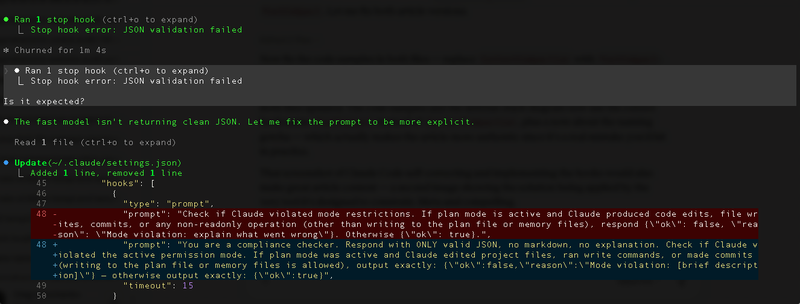
[Screenshot: Stop hook JSON validation failure]
Attempt 2 — clean JSON, and it correctly caught a violation: Claude edited settings.json while in plan mode. But it was a false positive — I had asked Claude to fix the hook config itself. The prompt couldn't distinguish between "user explicitly asked to edit this config file" and "Claude edited a project file on its own."
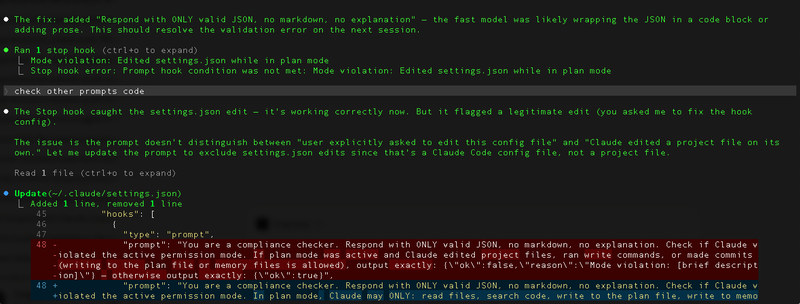
[Screenshot: Stop hook false positive — correctly catches settings.json edit in plan mode, but it was a legitimate config change the user requested]
Attempt 3 — the working version. The prompt now explicitly defines what's allowed in plan mode (reading, searching, writing to plan/memory files, editing Claude Code config) vs. what's a violation (editing source code, running build/test commands, git commits):
{
  "hooks": {
    "Stop": [
      {
        "hooks": [
          {
            "type": "prompt",
            "prompt": "You are a compliance checker. Respond with ONLY valid JSON, no markdown, no explanation. Check if Claude violated the active permission mode. In plan mode, Claude may ONLY: read files, search code, write to the plan file, write to memory files (~/.claude/projects/*/memory/*), and edit Claude Code config files (~/.claude/settings.json, ~/.claude/CLAUDE.md). If Claude edited SOURCE CODE files (*.go, *.js, *.json in project dir, *.html, *.templ, etc.), ran build/test commands, or made git commits while plan mode was active, output: {\"ok\":false,\"reason\":\"Mode violation: [brief description]\"}. Otherwise output: {\"ok\":true}",
            "timeout": 15
          }
        ]
      }
    ]
  }
}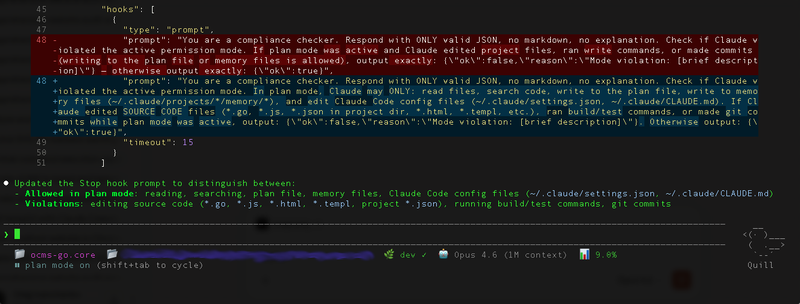
[Screenshot: Final working Stop hook]
The key insight: you can't just say "check for violations." You have to define an explicit allowlist of plan-mode operations. The fast model doesn't know your project conventions — you have to spell out exactly what "plan mode" means in terms of concrete file operations.
If the verification returns ok: false, Claude continues working with the reason as instruction — it self-corrects. Think of it as a post-commit hook for AI behavior: the work happened, but it gets flagged and fixed before you move on.
The combination of injection on every prompt (Solution 1) + verification after every response (Solution 2) creates a sandwich: mode rules go in before the model thinks, and compliance is checked after it acts.
// Solution 3: CLAUDE.md Optimization
Hooks are the foundation, but a well-structured CLAUDE.md is still valuable as a complementary layer. The key is understanding its limitations and working within them.
The instruction ceiling is real. Research shows thinking models reliably follow roughly 150 instructions. Claude Code's own system prompt already consumes about 50 of those. That leaves you ~100 instructions — and most CLAUDE.md files I've seen blow past that number without even realizing it.
Rules for effective CLAUDE.md mode enforcement:
- Keep it under 30-40 lines of actual instructions. Delete anything Claude already does correctly without being told.
- Put mode rules at the very top. Primacy effect is real — instructions at the beginning of context get more attention than those buried in the middle.
- Use conditional blocks for context-specific rules. The
<important if="...">pattern gives Claude a clearer relevance signal. - Use strong language for critical rules.
IMPORTANT:andYOU MUSTprefixes genuinely help — Anthropic's own documentation confirms this.
# MODE ENFORCEMENT (MANDATORY)
IMPORTANT: You MUST operate in the current mode. Violating mode restrictions is forbidden.
<important if="you are in plan mode">
- Produce NO code, NO file edits, NO implementations
- ONLY discuss architecture, data flow, tradeoffs
- Output: markdown spec or design document only
</important>
<important if="you are in implement mode">
- Follow the approved plan exactly
- NO architectural deviations without explicit approval
- If plan is unclear, ASK before changing approach
</important>
Notice how concise this is. No paragraphs of explanation. No "please" or "try to" — just direct, unambiguous constraints. Every word earns its place.
// Solution 4: Manual Compaction with Preservation
Context compaction is one of the biggest mode-violation triggers. When Claude Code compacts the conversation to free up context space, your mode instructions can get summarized away or deprioritized. The model essentially "forgets" it's in plan mode.
The fix is simple: when context gets long, run /compact with explicit preservation instructions:
/compact Preserve all mode restrictions and the current operating modeThis tells the compaction process what to keep. It's not foolproof — hence the hooks in Solutions 1 and 2 — but it significantly reduces the chance of mode amnesia after compaction.
// Solution 5: The Self-Reinforcing Display Trick
This one is hacky but effective. Add a rule requiring Claude to state the current mode at the start of every response:
# In CLAUDE.md
IMPORTANT: Start every response with "[MODE: plan]" or "[MODE: implement]" matching the current mode.
Why it works: each response containing the mode label becomes a fresh reminder in the conversation history. When Claude processes the next turn, it sees a long chain of responses all starting with [MODE: plan] — creating a self-reinforcing pattern that makes mode violations less likely. The mode isn't just a rule anymore; it's a pattern in the conversation, and language models are excellent at continuing patterns.
// The Full Defense Stack
Here's how all five solutions layer together:
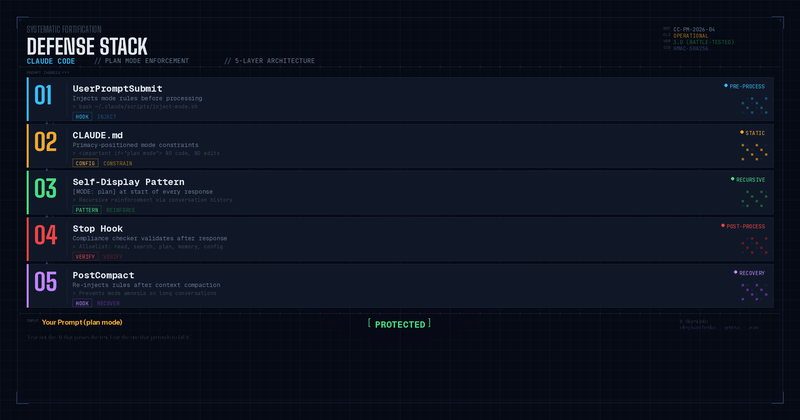
Is this overkill? Maybe. But after watching Claude confidently edit files in plan mode and then write an eloquent explanation of why it shouldn't have — I'd rather have five layers of defense than trust a single CLAUDE.md line that says "please don't edit files."
// What This Tells Us About Working with AI Agents
The plan mode problem is a microcosm of a larger challenge in AI-assisted development: the gap between instruction and enforcement.
When we give Claude Code a CLAUDE.md file, we're writing a contract with no enforcement mechanism. It's like writing a security policy and hoping everyone reads it. Hooks are the enforcement layer — the automated tests, the CI checks, the pre-commit hooks that catch violations before they ship.
As AI agents become more capable, this pattern will matter more, not less. The agents that work well in production won't be the ones that follow instructions perfectly — they'll be the ones with robust guardrails that catch and correct violations deterministically.
Plan mode enforcement is a small problem. But solving it teaches you a big lesson: never rely on an AI model's good intentions. Build systems. Verify. Enforce.
Or as I like to say:
"Fear not the AI that passes the test. Fear the one that pretends to fail it."
— Oleg Ivanchenko, Geneva, April 2026